













SMS API for Professional Business Communication
We provide you with the essential SMS APIs. All interfaces, except for email, are available exclusively to our business customers. Activation is free of charge. Simply sign up and start your trial period.
SMS API for business messaging via our Swiss gateway
Using our flexible and powerful interfaces, you can easily connect eCall to your applications, websites, or apps via the SMS API. Expand your business and web applications with reliable SMS functionality via the eCall SMS gateway.
We also provide developers with a wide range of sample applications as well as open-source code. Test your desired interface with all features for free here
HTTP/HTTPS Access
HTTP/HTTPS access allows you to send messages over the internet from any software. This means messages can be easily sent via this interface by calling a URL.
Furthermore, this method is particularly suitable as a solution for web programmers (using PHP, .ASP, etc.). Simply put, it functions like calling a webpage.
REST Interface
Send SMS messages reliably via our flexible and modern REST API. Ideal for individual messages and bulk sends.
Email Interface
This interface can be activated for free and allows you to send a message directly via email to a mobile phone via text message, to a pager, to a fax (including file attachments), or to a phone (voice message). You can use any email program (MS Outlook, Gmail, GMX, etc.) for this without any significant effort.
WebService Access
Our Web Service access offers the ability to send messages to various call systems using standardized web methods.
SMPP access
This service provides access to the Short Message Peer-to-Peer (SMPP) interface for sending text messages. Additionally, the SMPP interface uses a standard protocol primarily designed to connect to Short Message Service Centers (SMSCs) for mobile phones. This direct connection enables, among other things, the rapid, simple, and reliable transmission of large volumes of messages.
Not sure whether REST, HTTPS, SOAP WebService, SMPP or email is the best interface for your Swiss business messaging platform eCall integration? Our blog post on comparison of eCall APIs and interfaces explains the differences, supported channels and recommended use cases.
Send SMS via the eCall interfaces (API) in 3 easy steps
2
Select and activate the desired interface
Log in to your eCall account. In the navigation menu on the left, select “Interfaces.” Click on “Overview,” then click on the three dots next to the desired API under “Action.” Activate the interface.
3
Send and receive SMS
Call up the corresponding URL. Here is an example for the HTTPS API: https://url.ecall.ch/api/sms?username=maxmuster&password=s3cr3t&address=0041791234567&message=This is a test. Please note that your software must be able to call up a URL in order to send messages.
eCall Business Messaging is the Swiss SMS gateway provided by F24 Schweiz AG for businesses and organisations. The service enables the automated sending and receiving of SMS messages via REST API, HTTPS, SOAP Web Service, SMPP, email and a web portal. The systems are operated in Switzerland.
Our gateway’s unified SMS API simplifies your business communication
- Quick and easy integration into your business application
- Specifications: REST, SMPP, Web Service, HTTP/HTTPS, and Email
- Code examples and various business features
- No setup fees for any of our interfaces
- Personal support from our team in Wollerau (SZ).
- All services on our platform have a high global availability of > 99.9%

Thousands of customers from a wide range of industries rely on eCall






Our comprehensive API is suitable for use in numerous applications
You can find plenty of additional information, documentation, and guides regarding our interfaces in the help portal.

Text-to-Speech Messages
eCall converts written text into speech. The system calls the recipient and reads the message aloud.

Email to SMS Service
Send and receive notifications directly using your usual email program

SMS appointment reminders
Reduce the number of no-shows by up to 50% and boost your revenue.

Inform and coordinate employees | Scheduling
Send important information quickly and efficiently via SMS to your employees.

Send and receive customer information via SMS
Delivery status and pickup invitations, reservation and booking confirmations, surveys, birthday SMS, etc.

mTANs & OTPs for two-factor authentication
Send access codes, mTANs, and OTPs via SMS to your customers’ mobile phones.

SMS alerts & monitoring
Send alerts in case of malfunctions: SMS to voice, email to SMS, and email to pager simultaneously or sequentially with acknowledgment.

SMS contests
Sweepstakes with instant prizes, online contests, polls, quizzes, and surveys.

Push messages to Threema
Send messages to users of the Threema messenger app: directly from your account or your email program.
Hear what our customers have to say about eCall

N47 AG
Jeremy Haas | Co-founder & Vice President of Engineering
“When it comes to SMS whether receiving, sending, processing, or forwarding this is the company to turn to. Plus, the value for money is great, and so is the support.”
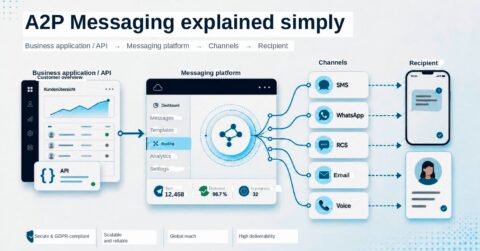
What is an SMS API?
- An SMS API is a software interface. Via a gateway, it enables the sending and receiving of text messages through programs and applications.
- Since SMS communication infrastructures and the internet are not “automatically” connected, an SMS gateway is required to link providers’ networkswith the internet. Only then can text messages be delivered to the intended recipients and received in return.
- In addition, this interface allows you to monitor the delivery status of a message.
Find out here what features
our gateway and SMS API offer
FAQ – eCall SMS Interfaces (API)
eCall offers various integration options:
– HTTP/HTTPS API – simple SMS sending via a URL call
– REST API – a modern and flexible interface for individual and bulk SMS
– WebService API – SOAP-based for system integration and process automation
– SMPP – high-volume SMS via a direct connection to the SMSC
– Email-to-SMS – sending and receiving SMS messages directly from any email client
Yes. eCall provides sample apps and source code, and offers free API testing via the portal.
Yes, the APIs are designed for both individual and bulk messaging.
Availability is > 99.9%; a premium 24/7 SLA (1-hour response time) is also available as an option.
The systems are located in Switzerland (Equinix, Greater Zurich Area).
Yes, eCall complies with the DSG (Switzerland) and the GDPR (EU) and is ISO/IEC 27001:2022 certified.
Yes, the email interface can be activated free of charge and used straight away.
e.g. appointment reminders, 2FA/OTP (mTAN), status/alert notifications, customer information, etc.
Yes, in addition to the SMS Threema push notifications can be used.
Yes, a free ServiceNow plugin is available in the Store (alerts, ticket updates, flows).
Information on prices can be found on the ‘Prices’ page; testing the SMS APIs is free of charge.
More Business APIs
You can use a WhatsApp Business API for communication. And it’s fully GDPR-compliant. To do this, link your Account directly to the Business Platform via the customer messaging software. During configuration, a unique WhatsApp API key is generated to connect your business account to the platform.