












Email to SMS for Business: Send Professional SMS Directly from Your Email Client
Send and receive text messages to individuals or groups directly via Outlook, Gmail, etc., with delivery and receipt confirmation.
Send, receive, and forward SMS directly from Outlook, Gmail and any other email program
Whether you want to strengthen your brand, send special promotional offers to customers, or keep your employees informed: sending SMS via email (Mail2SMS) to the mobile phones of individuals or entire groups is the ideal solution.
Are you looking for an SMS alerting solution that converts emails into text messages?
Would you like to forward SMS messages to an email address (SMS2Mail)?
How to send SMS messages to cell phones using your email program
With this quick guide, you can send messages in just a few minutes: Register
with eCall ► Write an email message ► Send as SMS.
Our system offers you additional options (Mail2Fax, Fax2Mail & Mail2Push) and numerous features for sending messages via email.
Send a message via email as an SMS to a cell phone (Mail2SMS)
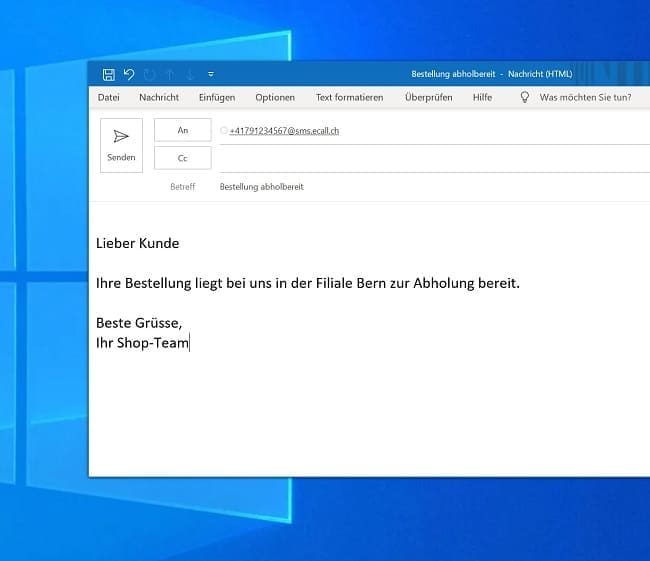
- Create a new email.
- Enter the recipient’s mobile number in the following format in the “To” field. For example: 41791234567 followed by @sms.ecall.ch as shown on the right in the screenshot.
- Type your message in the text field. Optionally, you can also enter text in the “Subject” field. This will appear above your message from the text field.
- Click “Send.”
Receiving a Reply (SMS2Mail)
- The recipients of your messages can reply directly from their cell phone and send a message back.
- You can view the replies either in your email program or in the logbook of your eCall account under “Received Messages.”
Your benefits with Email2SMS
- The email-to-SMS interface can be activated for free
- Every contact can be reached via the sender [email protected]
- Up to 5’000 recipients can be contacted simultaneously using eCall Business Messaging
- Recipients can reply to messages from the sender directly via cell phone
- Email-to-fax is also possible
- The email interface can be protected with security strings
Get started and try it for free in less than two minutes!

Send SMS from Outlook or any standard email program
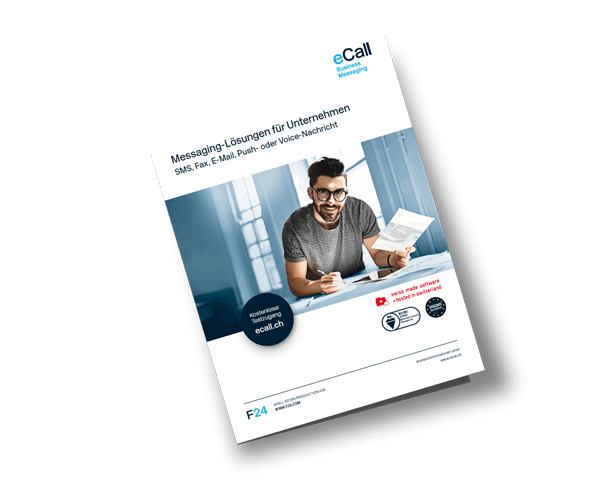
Learn how you can optimize your business communications with our SMS service and email-to-SMS in our brochure.
eSMS – Send and receive text messages via your PC. Billed through your mobile phone bill.
Conveniently pay via your monthly bill from Swisscom or Sunrise. eCall offers the “eSMS”* service for this purpose.
This allows you to send and receive SMS messages via the Internet directly from Outlook 2007 and 2010 or from any other email program to a smartphone.
Your benefits with eSMS
- Send & receive directly from Outlook or other email programs
- The email interface can be activated for free
- For Outlook 2007/10 users, there is the optimized version “OL Mobile Services (OMS)”
- Every contact can be reached via the address [email protected]
- Up to 50 recipients can be contacted simultaneously
- Direct feedback to your email address
- Billing directly on your Swisscom or Sunrise mobile bill
*This service is exclusively for Swisscom and Sunrise customers
Here’s how easy eSMS works:
► For Swisscom customers:
- For Outlook 2013, 2016, Office 365, or any other email program:
Send “START ABO MAIL DE” to the destination number 304 - For Outlook 2007 and 2010:
Send “START ABO ESMS DE” to the destination number 304
► For Sunrise customers:
- For Outlook 2013, 2016, Office 365, or any other email program:
Send “START MAIL DE” to the destination number 304 - For Outlook ’07 and 2010:
Send “START ESMS DE” to the destination number 304
To complete the setup, please follow the instructions in the user manual according to the email program you are using.
The initial SMS is free! You pay no basic fees. You are only charged for the messages you send:
CHF 0.20 per text message and 160 characters per recipient; billed directly to your mobile phone bill.
FAQ: eCall Email-SMS (Mail-to-SMS)
The Mail-to-SMS feature allows you to send SMS messages directly from any standard email program (e.g., Outlook, Gmail) and even receive replies to SMS messages in your email inbox—simply by using an email address in the format [email protected].
1) Create a new email.
2) Enter the phone number in the format [email protected] in the “To” field.
3) Enter the text in the message body (optional: subject line, which appears above the SMS).
4) Send the email and the message arrives as an SMS at the recipient’s phone.
– Free activation of the email-to-SMS interface.
– Flexible recipient count: Up to 5,000 recipients can be reached simultaneously.
– Direct replies possible – straightforward two-way communication model.
– Security-Option to secure messages via a security string.
Yes – the eSMS service is available specifically for Swisscom or Sunrise customers:
– Can be sent directly from Outlook or similar programs.
– Up to 50 recipients at once.
– Billed via the mobile phone bill at CHF 0.20 per SMS (up to 160 characters).
– Activation via SMS command (e.g., “START ABO MAIL DE” to 304).
Ideal for:
– Customer communication: SMS appointment reminders, confirmations, delivery notifications, surveys.
– Security and alerts: mTAN, OTP, alerts for critical events.
– Human resources & employee information: employee schedules, updates, organizational announcements.
– Marketing: SMS campaigns, SMS contests, subscription services, newsletter-style communication.
1.) Open an account -> Get a free trial account
2.) Log in and activate your email address
3.) Send SMS messages using your usual email program (Gmail, GMX, etc.) in the format [email protected]
Try it for free. And if you have any questions, we’re happy to assist you personally.
Phone support
during business hours:
41 44 787 30 70
Inquiries or support
via email:
[email protected]
Contact
via fax:
41 44 787 30 71