












Whether you need to send login codes, appointment reminders, delivery updates or fault notifications, any application that sends SMS automatically requires a reliable connection to an SMS gateway. eCall Business Messaging provides several interfaces for this purpose. But which one is right for your organisation?
The short answer: For new software, cloud and multichannel integrations, the REST API is usually the best choice because it supports SMS, WhatsApp and RCS. HTTPS suits straightforward URL calls and can also send fax and voice messages. SOAP WebService fits existing SOAP environments, SMPP supports persistent SMS connections, and the email interface enables sending without a development project.
This article compares the eCall REST, HTTPS, SOAP WebService, SMPP and email interfaces. It explains which channels and return functions they support, which systems they suit and which criteria should guide your decision.
What is an SMS API?
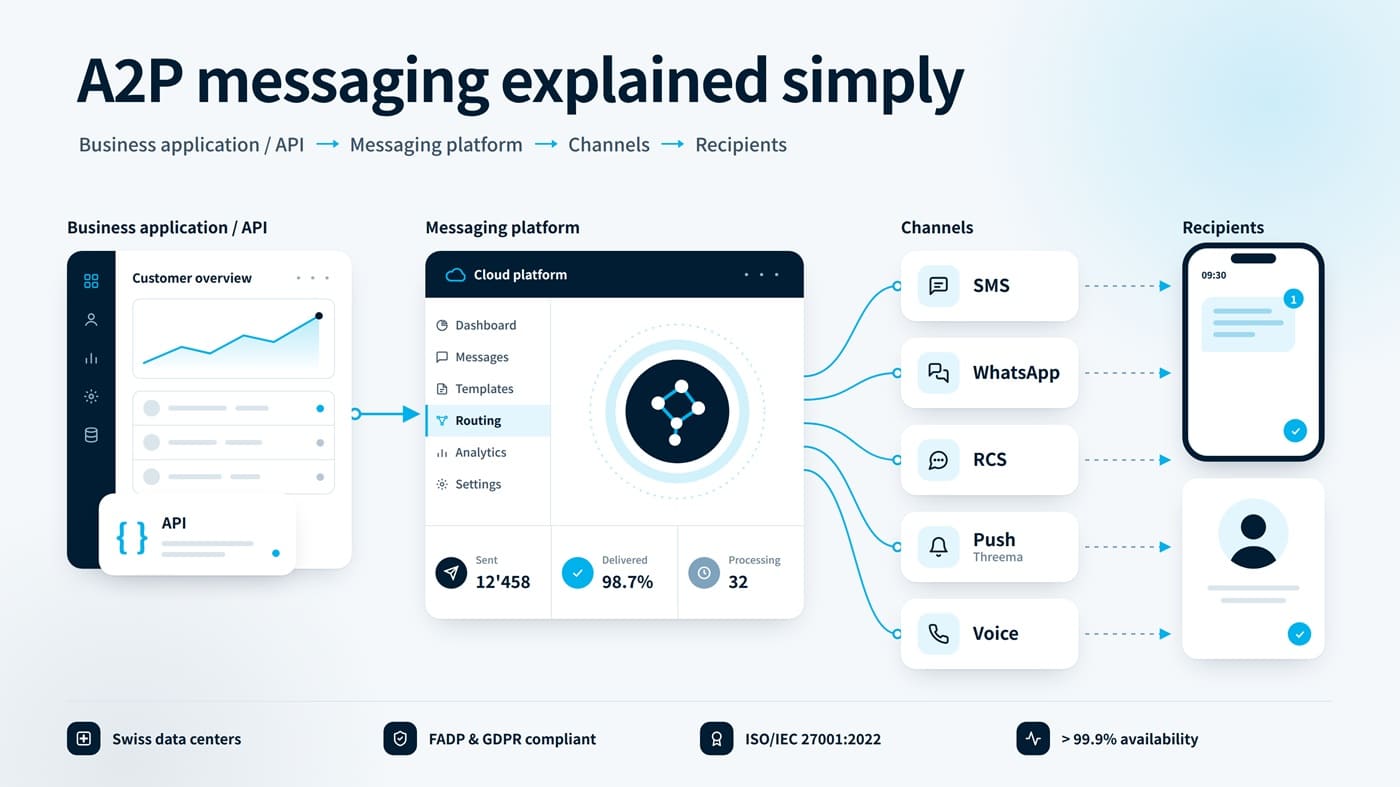
An SMS API is an application programming interface that enables software to send or receive SMS messages automatically. It can connect a CRM, ERP, booking system, customer portal, online shop, app or monitoring solution to a professional sms gateway.
The application supplies the recipient, sender and content. The gateway handles technical delivery and, depending on the interface, returns status updates, delivery receipts or inbound replies. Modern messaging APIs can support channels such as WhatsApp and RCS in addition to SMS
What is the difference between an SMS API and an SMS gateway?
The SMS gateway is the platform and technical infrastructure that sends and receives messages. The SMS API is the access point through which your software communicates with that gateway. Put simply: the gateway transports the message, while the API connects it to your system.
Which messaging interfaces does eCall provide?
eCall Business Messaging provides five central integration options: REST API, HTTPS, SOAP WebService, SMPP and email. REST supports SMS, WhatsApp and RCS; HTTPS and SOAP also enable fax and voice. SMPP focuses on SMS. The following overview shows the key differences between the SMS APIs and interfaces from eCall.
| Interface | Best suited for | Technical approach | Typical uses |
|---|---|---|---|
| REST API | New web, cloud and multichannel integrations | JSON over HTTPS; Basic Auth; explicit versioning | SMS, WhatsApp and RCS; single and list sends, status, webhooks and media |
| HTTPS | Simple or existing systems that can call URLs | GET or POST with URL parameters; HTTPS base URL | SMS, fax and voice; status queries, callbacks and inbound SMS |
| SOAP WebService | Existing SOAP and enterprise environments | SOAP 1.2 over TLS 1.2; WSDL and XML | SMS, fax, voice, fax attachments, status queries and notifications |
| SMPP | Continuous or high-volume SMS traffic | SMPP 3.4 over a persistent TLS connection | Single-part and multipart SMS, delivery receipts and inbound SMS |
| Sending without custom software development | Email-to-SMS with approved senders and configured formats | Operational updates, alerts and ad hoc communication |
Note: The precise configuration and available functionality depend on the eCall account and the interface enabled for it. Current technical information and examples are available in the eCall Developer Portal.
1. REST API: recommended for new and multichannel integrations
For most new software projects, the REST API is the natural choice. It transfers JSON over HTTPS and integrates readily with web applications, apps, cloud services, CRM systems and ERP platforms. In addition to SMS, it supports WhatsApp Business and RCS; media can be uploaded for rich-message content.
The API can send one message to one or several recipients, or multiple distinct messages as a list. Each accepted send returns message IDs. Status can be queried for up to seven days, while webhooks can report status changes and inbound SMS or WhatsApp messages. Applications can also retrieve the current account point balance.
The base URL is https://rest.ecall.ch. Connections use TLS 1.2 or TLS 1.3. Authentication is performed with HTTP Basic Authentication using either account credentials or a dedicated API sub-user. eCall provides v1 and v2; new integrations should explicitly select the required version in the URL path or request header. The example below uses v2.
The REST API is particularly suitable if you:
- are developing a new integration or modernising an existing application,
- want to use SMS, WhatsApp or RCS through a shared API,
- need single-message or list sends with structured JSON responses,
- want to process delivery status by query or webhook and route replies into your own workflows.
Simplified example of a REST request
A send request can look like the following simplified example. For production use, implement authentication, the current API version and all required fields in accordance with the Developer documentation.
POST https://rest.ecall.ch/api/v2/message
Content-Type: application/json
Authorization: Basic <API credentials>

{
 "channel": "Sms",
 "from": "YourCompany",
 "to": "0041791234567",
 "content": {
  "type": "Text",
  "text": "Your appointment is tomorrow at 10:00."
 }
}
2. HTTPS: sending URL parameters with GET or POST
The eCall HTTPS interface accepts URL parameters through GET or POST. Its base URL is https://url.ecall.ch/. The Api/Sms, Api/Fax and Api/Voice endpoints can send SMS, fax and text-to-speech calls. Parameter names are case-insensitive, and text is transmitted as UTF-8.
Applications can query status by JobID or for a defined time range through Api/State. Delivery notifications, replies and inbound SMS can be forwarded to configured destinations. A message cache is also available for retrieving and subsequently deleting SMS received on rented numbers.
HTTPS is particularly suitable if you:
- want to start with minimal development effort,
- need to connect an existing system using GET or form-encoded POST requests,
- want to trigger fax or voice messages in addition to SMS,
- want to incorporate status, replies or inbound SMS into straightforward workflows.
Practical recommendation: Use HTTPS exclusively and prefer POST when your system supports it. Protect credentials with appropriate secret management and avoid recording requests containing usernames, passwords or message content in logs.
3. SOAP WebService: suitable for SOAP-based enterprise systems
The eCall SOAP WebService provides standardised methods for SMS, fax and voice. SendFax supports up to ten Base64-encoded file attachments, while GetStateBasic queries send status using a previously assigned JobID. Depending on the method, notifications can be delivered to SMS, pager, email or HTTP(S) destinations.
The WSDL endpoint is https://soap.ecall.ch/eCall.asmx. Connections use TLS 1.2. eCall recommends SOAP 1.2 for new SOAP integrations; SOAP 1.1 will be discontinued. Unlike the HTTPS interface, SOAP parameter names are case-sensitive.
A SOAP interface is not automatically obsolete. In many established enterprise environments, SOAP is firmly embedded in integration platforms, middleware and internal standards. In these cases, the WebService may be quicker and less risky to integrate than a fundamental architecture change.
SOAP WebService is particularly suitable if you:
- already use a SOAP or XML infrastructure,
- want to integrate standardised web methods into existing business applications,
- generate WSDL-based clients in C#, Java or Python,
- want to retain an established enterprise integration.
4. SMPP: for persistent SMS connections
SMPP stands for Short Message Peer-to-Peer Protocol. It was designed specifically for exchanging short messages between external messaging systems and SMS centres. Unlike individual web requests, it typically uses a persistent connection.
The eCall SMPP interface is based on SMPP 3.4. The encrypted connection runs through smpp.ecall.ch on port 2776 using TLS 1.2 or TLS 1.3; unencrypted TCP is not supported. eCall supports single-part and multipart SMS, delivery receipts and inbound SMS forwarding through deliver_sm.
For most integrations, bind_transceiver is the recommended session type because it enables sending and receiving through one connection. The server closes the connection after 60 seconds without traffic; a client keeps it active with enquire_link.
SMPP is particularly suitable if you:
- process high or continuous message volumes,
- operate an existing SMPP infrastructure or messaging platform,
- need to route delivery receipts and inbound SMS directly into technical processes,
- require a high-performance, persistent connection for transactional messages.
SMPP is technically powerful but requires more integration and operational expertise than REST or HTTPS. REST is therefore simpler for many conventional business applications; SMPP may be the better architecture for platforms with persistent SMS sessions and high volumes. This makes SMPP particularly relevant for platforms handling high-volume A2P messaging and continuous transactional communication. Specific throughput requirements should be agreed with eCall for each project.
5. Email interface: SMS without custom API development
Not every automated SMS workflow requires a custom-built API integration. The eCall email interface enables companies to send messages as SMS from a standard email application or any system capable of sending email. Depending on the configuration, additional message types may also be available.
Approved sender addresses are defined for secure operation. eCall also recommends configuring a security string for enabled formats. Depending on the selected setup, replies can be processed in the email application or in the eCall account log.
The email interface is particularly suitable if you:
- want to send SMS without a development project,
- need to trigger notifications from a system that can send email,
- use Outlook, Gmail or another email application,
- need a simple and familiar process for operational teams.
Which eCall interface should you choose?
The right interface depends less on which technology is theoretically the most powerful and more on your existing system landscape, messaging volume and internal operating resources.
Our recommendation in one sentence: Choose REST for new and multichannel integrations, HTTPS for straightforward URL-based connections that use SMS, fax or voice, SOAP for existing enterprise architectures, SMPP for persistent SMS sessions, and email when no development project is desired.
Decision guide by starting point
| Your starting point | Recommended interface |
|---|---|
| You are developing a new web, cloud or app integration. | REST API |
| Your system can submit URL parameters through GET or POST. | HTTPS |
| Your existing architecture is based on SOAP and XML. | SOAP WebService |
| You process high SMS volumes through a persistent session. | SMPP |
| You want to send from email or an email-capable system without programming. | Email interface |
Which criteria matter when selecting an SMS API?
Before choosing an interface, answer the following questions:
- System landscape: Which protocols and data formats does your application already support?
- Messaging volume: Will you send individual transactional messages, periodic campaigns or continuously high volumes?
- Return channel: Do replies or inbound SMS need to flow automatically into your system?
- Status processing: Do follow-up processes and reports require message IDs, delivery status or delivery receipts?
- Channel requirements: Will SMS remain the only channel, or should WhatsApp, RCS, fax or voice be available through the same integration?
- Operating effort: Can your team operate a persistent connection, or is an HTTP-based integration more appropriate?
- Security: How will you control API credentials, permissions, destination countries and sending limits?
- Future readiness: Should the integration support additional channels or new use cases later?
How to integrate eCall in 5 steps
- Define the use case:
Specify which event triggers the message, who receives it and how time-critical delivery is. - Select the interface:
Match protocol, data format, volume and return channel to your system architecture. - Open an eCall account and enable access:
Activate the required interface in the portal. REST can use a dedicated API sub-user. - Test the integration:
Check sender IDs, number formats, character sets, multipart SMS, error cases, status responses and reply processes. - Secure production operations:
Monitor sending, status and costs. Restrict destination countries and daily volumes to fit the use case.
Security and control for automated SMS sending
An API integration automates not only communication but also access to messaging credit and recipient data. Technical credentials should therefore be protected, permissions restricted and unusual sending patterns monitored. Transport encryption is essential, but it does not replace disciplined credential and log management.
eCall provides country restrictions and daily limits for SMS sending. Companies can define the countries to which messages may be sent, set a daily limit for each country and receive an email notification when a limit is reached. These controls can further reduce unexpected costs and misuse involving foreign destinations.
For companies with demanding privacy and operational-security requirements, the provider’s operating framework also matters. eCall systems are located in two independent Equinix data centres in the greater Zurich area. F24 Schweiz AG is certified to ISO/IEC 27001:2022, complies with the revised Swiss Data Protection Act and the GDPR, and reports eCall system availability of more than 99.9 per cent. You can find certifications and compliance details under Data protection and data security at eCall.
Typical applications for the eCall SMS APIs
- OTP and two-factor authentication:
A system generates a one-time code and sends it directly to the registered mobile number. - Appointment reminders:
Medical practices, booking platforms and administrative systems automatically remind customers about upcoming appointments. - Delivery and status updates:
ERP systems, online shops and logistics solutions provide information about dispatch, collection or status changes. - Alerting and monitoring:
Monitoring systems notify on-call teams, IT managers or service organisations about disruptions without delay. - Employee communication:
Shift plans, deployment information and urgent internal updates are delivered automatically. - Customer service:
Ticketing and CRM systems confirm enquiries, announce callbacks or proactively report progress.
Test the eCall interfaces free of charge
There is no charge for enabling the eCall interfaces. REST, HTTPS, SOAP WebService and SMPP are available to eCall Business customers, while the email interface can also be enabled and tested. eCall provides technical references and code examples for developers.
Start with a clearly defined use case and test more than a successful send. Include invalid numbers, timeouts, status messages, multipart SMS, special characters, replies and configured sending limits. This turns a working prototype into a dependable integration.
Would you like to identify the right interface for your system landscape?
Test the eCall APIs or discuss your use case with an eCall expert.

Florian Frei
Florian Frei is Senior Marketing Manager for eCall Business Messaging at F24 Schweiz AG. He is responsible for positioning and marketing the Swiss business messaging platform and focuses on how companies can automate their digital communications securely, reliably and efficiently. His areas of expertise include business SMS, SMS gateways and APIs, A2P messaging, CPaaS, WhatsApp Business, RCS, omnichannel communications, data protection and data hosting in Switzerland. In his expert articles, he provides practical guidance on integrating modern messaging solutions effectively into customer service, marketing and operational processes.Business, two-factor authentication, data protection and digital customer communication for companies.
FAQ about the eCall SMS APIs and interfaces
For new web, cloud and app integrations, the REST API is usually the best choice. It uses JSON over HTTPS, supports SMS, WhatsApp and RCS, and provides status queries, webhooks and list sends.
SMPP may be suitable for high or continuous SMS volumes. The protocol uses a persistent TLS connection. Required throughput and operating requirements should be agreed with eCall.
REST uses structured JSON resources and supports SMS, WhatsApp and RCS. The HTTPS interface submits URL parameters through GET or POST and can send SMS, fax and voice. Both provide status and return-channel functions, but use different data models.
Yes. The REST API supports SMS, WhatsApp Business and RCS. WhatsApp requires a registered WhatsApp Business Account, while RCS requires a sender ID registered with the provider. Media for rich messages can be uploaded through the REST API.
SOAP WebService is appropriate when a company already operates WSDL, SOAP or XML integrations. It supports SMS, fax and voice. eCall recommends SOAP 1.2 for new SOAP integrations; SOAP 1.1 will be discontinued.
Yes. The email interface can send SMS from an email application or email-capable system. Alternatively, the eCall web portal is available for manual sending.
Yes. REST queries status using a message ID or message-list ID and can report status changes through webhooks. HTTPS uses Api/State, SOAP uses GetStateBasic, and SMPP provides delivery receipts through deliver_sm. The exact response depends on the channel and provider.
Yes. With a rented eCall receive number, inbound SMS can be processed through a REST webhook, HTTPS forwarding or message cache, or SMPP deliver_sm, depending on the interface.
Yes. Companies can open an account, activate the required interface and test the integration. Documentation, examples and further technical information are available in the eCall Developer Portal.
The eCall systems are located in two independent Equinix data centres in the greater Zurich area. F24 Schweiz AG is certified to ISO/IEC 27001:2022 and complies with the Swiss Data Protection Act and the GDPR.
Credentials should be protected and permissions restricted. eCall also allows companies to configure permitted destination countries, daily limits by country and email notifications when a limit is reached.